Examples
Checkout our example content here, you'll find .nxt graphs demonstrating these same topics.
If you're not quite sure how nxt fits into your workflow checkout our workflow and transition map here. Over there we explain nxt from different vantage points to help illuminate how nxt can work for you.
Tutorials
Introduction to tokens
01 Making and executing a node. Hello world.
- Make a node
- Add code
- Setup a token
- Use the output log
02 Adding and using attributes and tokens in code
- Naming
- Attribute types
- More on substitution
Execution and Inheritance
03 Making and executing a series of nodes
- Executing nodes in sequence
- Pathing to nodes and attributes
- Execution options
04 Inheriting within a stack
- Stacks execution
- Inheritance within stacks
- Parent / unparent nodes
- Changing attribute display
Additional notes on execution, history, build view
- Start points
- Break points
- Build view
- History view
05 Using attributes from other nodes
- Linking to other attrs
- Pathing to other attrs
Instances
06 Node instances
- Instances
- Instance path
- Local vs instanced attributes
- Instances of instances
More on attributes
07 Notes on renaming
- NXT doesn't rename anything automatically
- But it will recomp based on name
08 Attribute overloading and reverting
- Resolution order
- Node, parent, instance
09 Writing data to attributes from code
- Using
self.attr - Usign raw, resolved, cached view
Layers
10 Layering and compositing
- Adding layers
- Layer display state
- Active layer
- Executing part of a layer
- Adding new attrs and overrides on a layer
Contexts
Sub-graphs
- Referencing builtin layers
- Calling sub-graphs
- Getting and using returns from sub-graphs
Remote graphs
Coming soon...
Walkthrough: references and reloading
This walkthrough uses the example graphs from the
examples folder.
layering.nxt references the_basics.nxt, so opening it gives you a graph
built from two files.
Add a reference
- Open
layering.nxtwith File > Open Graph (Ctrl+O). - In the Layer Manager, right click the layering layer and choose
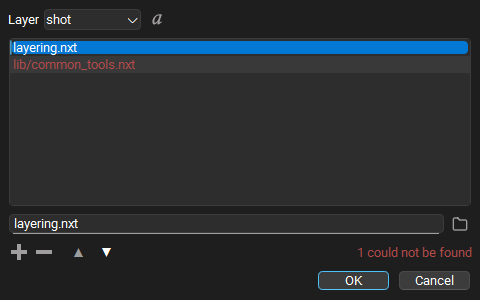
Edit References.... The list shows
the_basics.nxt, the one reference this layer has. - Press +. An empty row is added and the cursor goes to the field under the list.
- Type
file_list.nxt, or press the folder button and pick the file. The new row is drawn normally because the file is found next to the layer. (Had a folder inNXT_FILE_ROOTSheld afile_list.nxt, that one would be used instead: roots are looked in before the layer's own folder. See How references are found.) Type a path to a file that does not exist and the row turns red, with1 could not be foundunder the list. - Press OK. The referenced layers are loaded and the graph is
composited again. The layer is now marked unsaved; Save Layer
(
Ctrl+S) writes the new reference intolayering.nxt. Undo (Ctrl+Z) takes the change back.
Tip
Order matters: a reference higher in the list is stronger than the ones below it. Drag rows to change the order. Toggle the resolved view to see where each reference lands on this machine.
Pick up somebody else's changes
- Change
the_basics.nxtoutside this session, for example by opening it in a second editor, editing a node and saving. - Back in the first session, right click the layering layer and choose Reload Source....
- Every file the layer is built from is listed and checked. Uncheck any you do not want read again, then press Reload Checked.
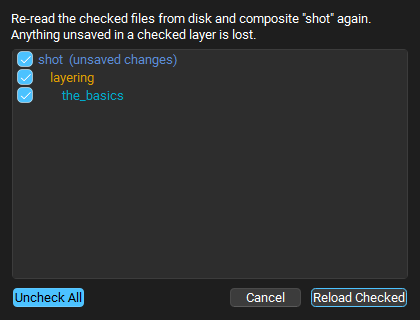
The graph now shows the saved changes. Rows marked (unsaved changes) lose
those changes when reloaded, but Undo puts them back.
Find your way around a big compute
Select a node with code, double click into the code editor, and try:
Ctrl+Fto find a word,F3to step through the matches, and the chevron to replace them.Ctrl+Gto jump to a line.Ctrl+Spaceafteros.in a compute that importsos, or after${, to see what completion offers. After${/it offers the graph's node paths, and after${/some_node.that node's attributes.- Leave editing (
Esc), pressQfor Raw View, and hover a${}token to see its value. HoldCtrland click a token that reads another node's attribute to jump to that node.
See Code Editor for every shortcut.
Example Graph Walkthroughs
Still pending
mGear
The Rigging Buddies Podcast
Time stamps can be found in the video description on YouTube.
Download Ball Rig Example
Download "Roller Girl" by Sergi Caballer